
Computer Vision in Everyday Apps: How Your Phone Actually Sees
Unlock your phone. Take a photo of a dog. Ask your banking app to let you in. All three use the same trick, and none of them look anything like how a human sees.
Here's the thing — computer vision isn't one clever trick. It's a stack of small, very fast guesses your phone makes in the time it takes you to blink. When you unlock with Face ID, the TrueDepth camera projects thousands of invisible dots, maps them into a shape, and checks it against the face it stored. The whole dance takes about a second, and it does it on a chip that also has to run your music and your messages.
(Minor aside: if you've ever had Face ID fail while wearing sunglasses, it's because the infrared dots can't get past dark lenses. Not a bug — a feature of the physics.)
Computer Vision in Your Pocket: How Face Unlock Works
Face unlock is the most visible example of computer vision most people meet every day. Here's the short version of what happens.
- Your phone shoots out infrared light (invisible to you, very visible to the camera).
- It bounces off your face and builds a 3D map.
- A neural network compares that map to the one it stored when you set up the feature.
- If they match closely enough, the lock opens.
That last step is the part most people skip over. It isn't storing your photo — it's storing a mathematical description of your face, and the comparison happens locally, on the device. Apple says the match probability is about 1 in 1,000,000 for a random person. Google's Pixel face unlock is simpler and less secure, which is why it warns you it can be fooled by a good photo in decent light.
My honest take: face unlock is the best daily convenience most people never think about. But treat it as convenience, not security. For banking, use a password or a PIN.
From Photo to Caption: How Apps Read Pictures
Open Google Photos and hover over any picture — it'll tag the dog, the beach, maybe even your cousin by name. That's image recognition, and it's been good enough for years that we've stopped noticing it.
The trick is transfer learning. Engineers train a model on millions of labeled photos (here's a dog, here's a dog, here's definitely a dog), then strip off the final layer and reuse the earlier layers for a new task. It's like learning to recognize furniture after already learning to recognize edges and textures. The second job is much easier.
Snapchat's filters use the same idea. When the dog's ears turn into rainbow horns, the app first has to find the dog, then find the top of its head, then warp the graphic in 3D space. All of that is computer vision, and it runs on your phone in real time.
Object Detection: When Your App Knows What It's Looking At
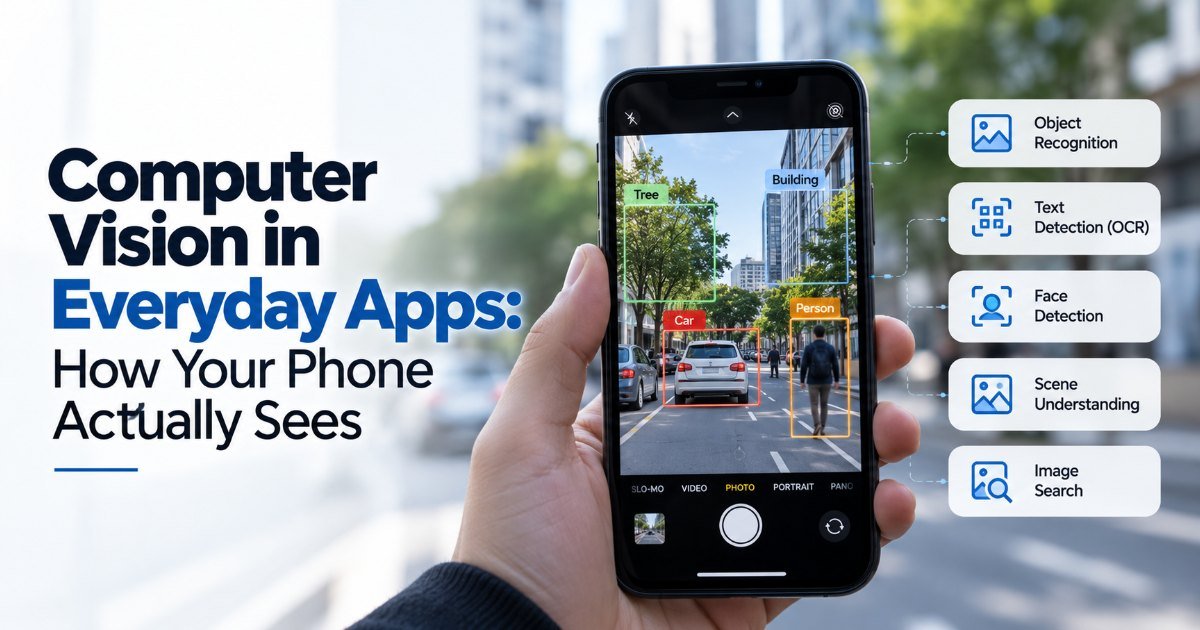
Object detection is the step beyond "what is this?" — it's "where is this, and how many are there?"
Your Google Maps Street View car does this. It reads house numbers and street signs so Google can fill in map data nobody manually typed. Tesla's Autopilot does it at highway speeds, identifying cars, lane markings, and pedestrians — and when it gets it wrong, the news is very loud.
Here's a useful distinction. Classification answers "what is this thing?" Detection answers "where are all the things, and how many?" Localization adds "how close is it?" Your phone camera's portrait mode does all three: it classifies your subject, detects the edge of their head, and localizes the boundary so it can blur the background.
The Honest Limitations
Computer vision in smartphones works well in daylight, on clean faces, with cooperative subjects. It stumbles in the places you'd actually want it.
- Low light degrades accuracy fast. Night modes help, but they're patching vision with computation.
- Occlusion breaks it. A hand over a barcode scanner, a mask over half a face, a shelf blocking a product — all of these are everyday killers of good vision.
- Bias is real. Early facial-recognition systems were dramatically worse at recognizing darker skin tones, and that didn't fix itself. It took external audits and public pressure.
My recommendation: assume vision systems are assistants, not authorities. They're fast, they're convenient, and they're good enough for casual use. They're not good enough to trust with something you can't undo.
Is Computer Vision in Smartphones Worth the Hype?
Short answer: yes, but only the parts that stay out of your way.
The features that win are the invisible ones — face unlock, photo search, QR scanning. The ones that try to replace something (autonomous driving, medical diagnosis, legal evidence) deserve your skepticism until they've been audited by people who aren't paid by the company selling them.
Key Takeaways
- Computer vision in everyday apps is a stack of fast guesses, not true sight.
- Face unlock maps your face into a stored mathematical model, not a photo.
- Image recognition got really good because of transfer learning trained on millions of labeled images.
- Object detection locates items, which is what portrait mode and Street View depend on.
- Low light, occlusion, and bias are the three places vision still fails.
- Treat vision features as convenience, not authority.
Frequently Asked Questions
How does phone camera recognize faces?
Your phone projects infrared dots, builds a 3D map of your face, and runs a neural-network comparison against a stored model. The match happens on the device, not in the cloud, and Face ID's false-match rate is roughly 1 in a million for a random person.
Is AI image recognition accurate enough for everyday use?
For tagging photos, filtering video, and scanning QR codes — absolutely. It's been reliable for years. For high-stakes decisions like medical scans or legal identification, you should wait for third-party validation before trusting it.
What is object detection and how is it different from image recognition?
Image recognition answers "what is this?" Object detection adds "where are they?" and "how many?" Your phone's portrait mode uses both: it recognizes your subject and detects the edge so it can blur the background.
How did this story feel?
Be the first to react
Written by
TechPulse Team
The TechPulse editorial team publishes clear, practical technology guides. Every article is original and written to be understood — not just skimmed.
Comments (0)
No comments yet — start the conversation!
Keep reading

Why Data Quality Matters More Than the Algorithm
Your model passed every test. The data didn't. Why data quality matters more than the algorithm, with real examples from Tay to retail and healthcare models.

How Chatbots Remember — And the Mistakes You're Making
You're three messages into a chat with an AI assistant. You tell it your dog's name, your goto coffee order, and the deadline for that big project. You close…

Machine Learning Basics Without the Math Panic
You don't need advanced math to understand machine learning. Here are the mistakes most beginners make — and what to focus on instead.