
What Is a CDN? How Your Site Loads Worldwide
TL;DR: A CDN (content delivery network) keeps copies of your site's files on servers in many cities, so visitors load them from somewhere nearby instead of your main server. That usually means faster pages, less strain on your server, and a site that stays online during a sudden rush of visitors. You set it up through a provider like Cloudflare, then tune what gets stored and for how long.
Imagine your bakery site is hosted in London. A customer in Tokyo clicks your homepage, and every photo has to travel halfway around the world. That's the problem a CDN solves.
What Is a CDN, in Plain English
A CDN is a content delivery network: a group of servers in many cities that hold copies of your site's files. Your main server (called the origin) still runs the site and database. The database is where your product and order data lives.
The CDN's nearby computers, often called edge servers, hand out images, fonts and sometimes whole pages. They also send the files that control how a page looks and behaves. When someone in Tokyo visits, their browser grabs those files from a Tokyo or Osaka edge server. The request doesn't cross the Pacific for every image. The result is a page that feels local even when your team is in Leeds.
How CDNs Work When Someone Loads Your Page
The first time a visitor asks for a file, the edge server may fetch it from your origin and keep a copy. The next visitor gets that saved copy. Caching means storing a copy so it doesn't have to be fetched or rebuilt every time.
For live parts, like a shopping cart, the CDN can pass the request back to your origin. The CDN vs server split is simple: the CDN delivers files, while your server runs the site logic and database. A CDN is not a replacement for a slow server. It hides some slowness, not all.
CDN Caching Explained Without the Headache
Cache images, fonts and the files that style your pages for days or weeks. Cache whole pages carefully. Never cache pages that show a customer's name, cart or bank balance unless you have tested the rules hard.
You also need a way to purge, which means clearing an old copy after you update a page. Set a short shelf life for changing pages, and a long one for logos and product photos that rarely change. My advice: start with strict rules for files that rarely change and leave whole pages alone until you're comfortable.
What This Means for Your Website
If most visitors are local, a CDN still helps with images, but the speed gain is smaller. If you sell to customers across continents, set up a CDN before your next ad campaign. A traffic spike from a viral post is exactly when a CDN earns its keep.
For a small site, Cloudflare's free plan is a sensible start. Bunny.net is often cheaper for teams moving lots of images or video. Amazon CloudFront and Fastly suit bigger setups where you need fine control. If you want better website speed worldwide, test one page from a phone on mobile data after setup.
How to Choose a CDN
Pick based on where your visitors are, what you cache and how much support you need. Don't pay for premium features you won't use. Do check the purge speed, because slow cache clearing causes very public mistakes.
Key Takeaways
- A CDN stores copies of your files closer to visitors.
- It speeds up files that rarely change, like images, fonts and page styling.
- It reduces load on your origin server during traffic spikes.
- Start with simple cache rules and clear old copies after updates.
Frequently Asked Questions
What is a CDN in simple terms?
A CDN is a network of servers that keeps copies of your website's files in many places. Visitors download from a nearby copy, so pages load faster.
Does a CDN make my website faster?
Usually yes, especially for images and visitors far from your server. It won't fix slow code, a messy database or a badly built page.
Do I need a CDN for a small website?
Not always, but it's cheap insurance if you have customers outside your region. Cloudflare's free plan is enough to test the idea.
How did this story feel?
Be the first to react
Recommended gear
Popular tech picks

Samsung Galaxy S25 Ultra
6.9" AMOLED · 200MP · 5000mAh
Editor's pickView on Amazon →
Apple MacBook Air 13-inch (M4)
M4 · 16GB · 13.6" Liquid Retina
Editor's pickView on Amazon →
Sony WH-1000XM5
Over-ear ANC · 30h battery
Best headphonesView on Amazon →Affiliate links: we may earn a commission at no extra cost to you.
Written by
TechPulse Team
The TechPulse editorial team publishes clear, practical technology guides. Every article is original and written to be understood — not just skimmed.
Comments (0)
No comments yet — start the conversation!
Keep reading

REST vs GraphQL: a real project shows the difference
One food-delivery screen needs four calls with REST and one with GraphQL. Here's what actually matters when you build it.
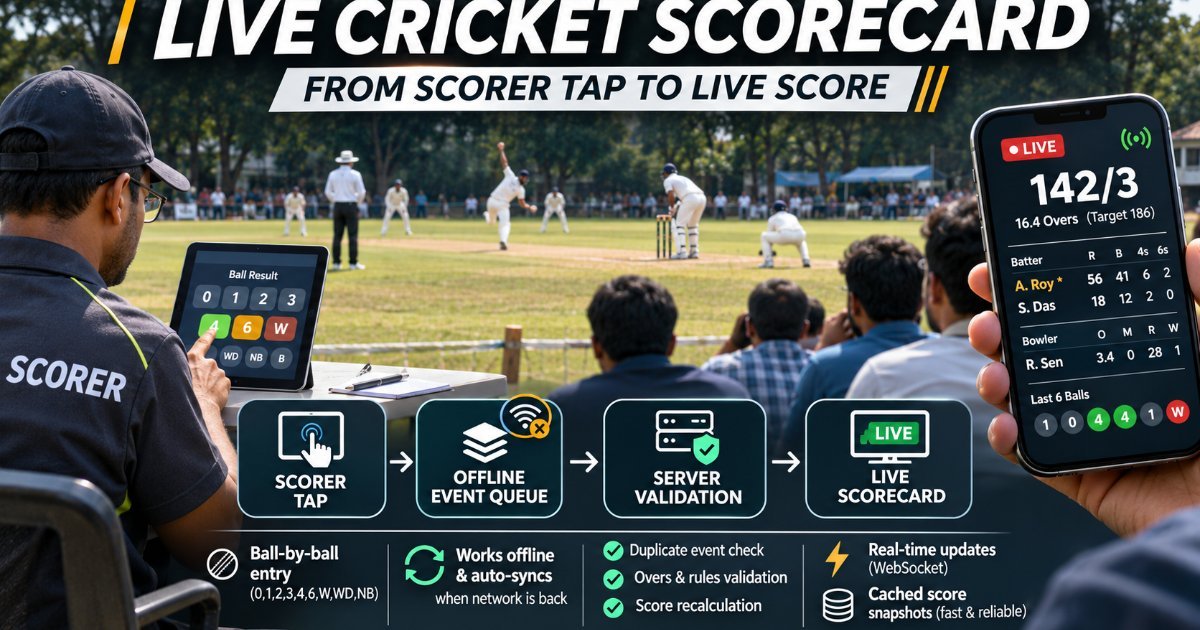
What Happens Between a Scorer's Tap and Your Live Cricket Score?
A live scorecard is a data pipeline disguised as a scoreboard. Here is what has to go right between the scorer's tap and your phone.

How Core Web Vitals Affect Your Google Rankings
Core Web Vitals are Google's three speed and stability scores. They break ranking ties, not decide them. Here's how to check yours and fix the pages that matter.