
Appliance Software Updates: Why They Matter Now

A friend texted me a screenshot last week: her washing machine wanted to install a software update. She laughed. Then she asked the real question — could ignoring it break the thing? That question is why appliance software updates matter now.
Your oven has code in it. Your dishwasher may have a network card. Your washer probably talks to an app you opened once and forgot about. That’s not a gimmick anymore. It’s maintenance.
Why your fridge wants Wi-Fi in the first place
Modern appliances ship with control boards, Wi-Fi modules, and companion apps. A connected washer can tell you a cycle is done. A smart oven can preheat while you’re still at the store. A robot vacuum can remap a room after you move the sofa.
All of that runs on software. Not phone-level software with weekly patches, but real firmware with bugs, security holes, and compatibility quirks. When Samsung SmartThings, LG ThinQ, Bosch Home Connect, GE SmartHQ, or Whirlpool pushes an update, it’s usually fixing something you don’t want to discover mid-cycle.
Here’s my honest take: I’d rather have a boring appliance that gets security patches than a flashy one that never does. A firmware update is not a personality. It’s maintenance.
What can actually go wrong if you ignore them
Most of the time, nothing dramatic. The appliance keeps washing dishes or drying clothes. That’s why people ignore the notification.
But there are real risks:
- Security holes stay open. A connected appliance is a small computer on your network. Weak firmware can be a doorway.
- App features break. Integrations with Alexa, Google Home, SmartThings, or Apple Home can stop working after a backend change.
- Bug fixes sit unused. Weird error codes, flaky app connections, and inaccurate cycle estimates sometimes get fixed in firmware.
- Support asks you to update first. Many help desks won’t troubleshoot further until your appliance is on current software.
- Compatibility fades. Older firmware may not support newer smart-home standards or app versions.
I’m not saying you need to camp on your appliance app every Sunday. You don’t. But a ten-minute check every month or two is cheap insurance.
How to update appliance software without turning it into a hobby
Start with the manufacturer’s app, not a random forum. The app usually shows the current firmware version and whether an update is available.
Common examples: Samsung appliances live in SmartThings, LG appliances in ThinQ, Bosch and Siemens in Home Connect, GE Profile in SmartHQ, and Whirlpool in its own app. Robot vacuums like iRobot Roomba update through the iRobot Home app. If your appliance isn’t connected, check the manual — some models allow updates by USB, though that’s less common for large appliances.
A few practical rules:
- Use a stable 2.4 GHz Wi-Fi network if the appliance supports it. Many appliance radios are not happy on 5 GHz.
- Update one appliance at a time. If something goes wrong, you’ll know which one.
- Don’t start an update during a wash, bake, or dry cycle. Wait until the appliance is idle.
- Keep your phone and the app updated. A stale app can’t always talk to new firmware.
- Read the release notes. They’re boring, but they tell you whether the update is a security patch, a feature add, or a minor fix.
- Never install firmware from a random download site. This is not a phone ROM community. A bad appliance firmware file can brick a control board.
The appliance software updates checklist
Use this before you tap Install. It’s the checklist I wish every appliance app put on the first screen.
| Stage | Check | Why it matters |
|---|---|---|
| Before | Confirm the update is from the manufacturer app | Avoid fake firmware files |
| Before | Note the current firmware version | Gives you a rollback reference if support asks |
| Before | Make sure the appliance is idle | Prevent interrupted cycles |
| Before | Check Wi-Fi signal near the appliance | Weak signal causes failed downloads |
| During | Leave the power on and don’t unplug it | Interrupting firmware can brick the board |
| During | Keep your phone nearby | Some updates need the app to stay open |
| After | Let the appliance restart fully | Don’t rush it back into a cycle |
| After | Test one basic function | Confirm the update didn’t break normal operation |
| After | Check app connectivity and smart features | Catch integration issues early |
If the update stalls for more than an hour, don’t panic-unplug. Check the app, the manual, or the manufacturer’s support page first. Pulling the plug mid-update is how a simple fix becomes a service call.
Smart appliance firmware update: the 10-minute monthly habit
A smart appliance firmware update doesn’t need to be a monthly ritual. But a quick check every month or two is sensible, especially if your appliances are connected to your home network.
My routine is simple. I open the manufacturer app, check for updates, and install anything marked security-related. Feature updates can wait until I have time. I don’t chase every minor release on a dishwasher. I do care about patches for anything with a camera, microphone, or remote-control feature.
One more thing: don’t buy an appliance today purely on a promised future update. Manufacturers do add features later, but a promise is not a firmware version. Buy for what works now, then treat updates as a bonus.
Appliance cybersecurity starts at your router
Appliance cybersecurity sounds dramatic until you remember that a connected oven is a network device. You don’t need a security operations center. You do need basic hygiene.
Use a strong Wi-Fi password. Put smart appliances on a guest network if your router supports it. Disable remote access features you don’t use. Remove old appliances from your app when you replace them. And if a manufacturer stops supporting a connected model, treat that appliance like any other end-of-life device — don’t expose it to the internet.
I’ll take a slightly boring router setup over a fridge that’s still using an unpatched firmware from three years ago. That’s not fearmongering. It’s just housekeeping.
Smart home compatibility and the Matter factor
Smart home compatibility is where updates get interesting. A firmware update can add support for Matter, Thread, or a new voice assistant. It can also fix a broken integration after a platform changes its API.
That’s useful. But don’t overpay for “future compatibility” you can’t test today. Matter and Thread are improving, and more appliances are joining, but the experience still varies by brand and model. Check the manufacturer’s current compatibility list before you buy. Then check it again after a major update.
If your appliance works with Alexa or Google Home and then stops after an update, don’t assume the appliance is broken. Check the app, re-link the service, and look at the release notes. Nine times out of ten, it’s a permissions or integration issue, not a dead control board.
When to call support instead of tapping Install
Sometimes the right move is to stop clicking. Call support if the app shows an update but the appliance never sees it, if the update fails repeatedly, or if the appliance gets stuck in a boot loop after restarting. Also call if you see a new error code that wasn’t there before.
Don’t let a support agent talk you into unplugging the appliance during an active firmware update unless they specifically tell you to. “Turn it off and on again” is great advice for a router. It’s terrible advice for a control board that’s writing firmware.
Key Takeaways
- Appliance software updates are maintenance, not a gimmick.
- Check the manufacturer app first — SmartThings, ThinQ, Home Connect, SmartHQ, or Whirlpool.
- Install security patches promptly; feature updates can wait.
- Keep the appliance idle and powered during updates.
- Use a stable 2.4 GHz Wi-Fi network and avoid random firmware files.
- If an update stalls or loops, contact support before unplugging anything.
Frequently Asked Questions
Do appliance software updates happen automatically?
Some connected appliances can auto-update, but many still require you to approve the update in the manufacturer’s app. Even with auto-update enabled, it’s worth checking the firmware version occasionally. Automatic doesn’t always mean current.
What happens if I ignore a firmware update on my washing machine?
Usually nothing immediate. The washer keeps working. But you may miss security fixes, app compatibility patches, or bug fixes for error codes and cycle behavior. If you use smart features, ignoring updates for too long can cause connection problems.
Can a software update break my appliance?
It can, though it’s uncommon when the update comes from the manufacturer app and the appliance stays powered. Most failures happen when the update is interrupted, the Wi-Fi drops, or the wrong firmware is installed. That’s why you should update one appliance at a time and never use random download sites.
How did this story feel?
Be the first to react
Written by
TechPulse Team
The TechPulse editorial team publishes clear, practical technology guides. Every article is original and written to be understood — not just skimmed.
Comments (0)
No comments yet — start the conversation!
Keep reading
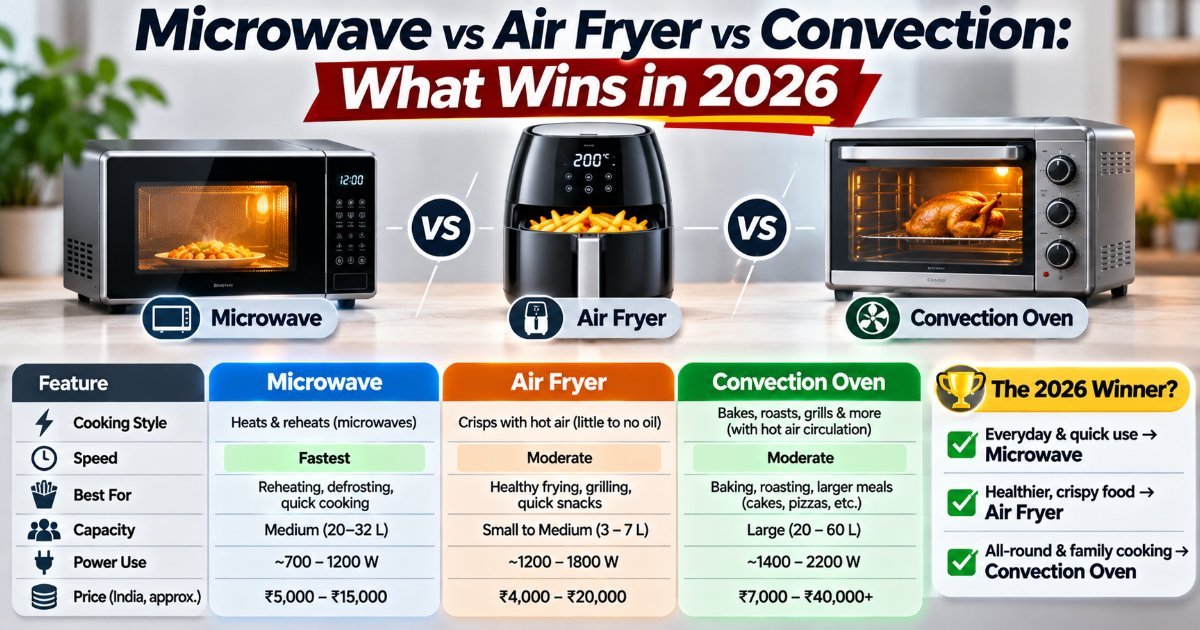
Microwave vs Air Fryer vs Convection: What Wins in 2026
Three appliances, one countertop, and a lot of overlap. Here's what each one genuinely does best in 2026 — and the combo you should probably skip.

Appliance Lifespan: How Long Stuff Actually Lasts
Your grandmother's refrigerator ran for 30 years. Your fiveyearold washer just quit, and the repair quote is $700. What changed? Modern appliance lifespan is…

Smart Fridge Features That Actually Earn Their Keep
Smart fridge features are easy to mock until one saves you a grocery run. Here's what's actually useful, what's hype, and what I'd buy.