
Standby Power Audit: Find What's Wasting Money

TL;DR: Standby power is the electricity your appliances drink while they're switched off but still plugged in. In most homes it adds up to roughly 5–10% of the electricity bill. A cheap plug-in energy meter and one hour of testing tells you exactly what's worth unplugging.
It's 2 a.m. and your living room is still lit up. A red dot on the TV, a blue clock on the microwave, a router blinking in the corner. None of those things are "on." All of them are on your electricity bill.
What standby power actually means
Standby power (also called phantom load or vampire power) is what a device draws when it's plugged in but not doing its main job. It keeps a clock running, listens for the remote, or stays ready to switch on instantly.
The maths is simple: 1 watt running nonstop for a year uses 8.76 kilowatt-hours (kWh). At ₹8 a unit, that's about ₹70. Ten devices idling at 2W each and you're near ₹1,400 a year for nothing.
The trend is mixed. Rules in Europe and parts of the US now cap most new devices at 0.5W in standby, and newer gear behaves. But we've added a second wave of devices that never really sleep: smart speakers, mesh routers, set-top boxes, TVs with "quick start" modes.
How to audit standby power in about an hour
You need one tool: a plug-in energy meter. The Kill A Watt is the classic at around $25–30. In India, brands like Meco and generic "energy meter plug" units sell for ₹700–1,500, and many smart plugs report live wattage too.
- Plug the meter between the wall socket and one appliance.
- Switch the appliance off with its remote or button, not the wall switch.
- Wait a minute for the reading to settle. Note the watts.
- Repeat for the TV, set-top box, console, router, printer, microwave, washing machine and anything with a light or clock.
- Multiply each reading by 8.76 for yearly kWh, then by your electricity rate. (2W × 8.76 = 17.5 kWh, roughly ₹140.)
Where phantom load hides
- Set-top boxes and DVRs. Often the worst in the house, drawing 10–20W around the clock to record and download updates.
- Game consoles in rest mode. A PS5 or Xbox in "instant on" can pull 5–15W. Energy-saving mode drops that under 1W, but boots slower.
- TVs with quick start. A few watts to keep apps warm so the home screen appears faster. Switch it off in settings if you can wait five seconds.
- Printers and desktop PCs. Printers often sit at 3–10W waiting for a job.
- Microwaves and ovens with clocks. 2–4W each. Small, but there are usually two or three.
Skip the phone chargers, honestly. A modern charger with nothing plugged in draws almost nothing.
What this means for you
Do the audit once, then fix the top three offenders. A single switchable power strip for the TV corner can kill five devices at once, and a scheduled smart plug handles the rest without you thinking about it.
Don't unplug the fridge, the router or anything holding a schedule. And don't crawl behind furniture every night — you'll quit within a week. Group devices onto one strip instead. If your total idles under 20W, your appliances are fine and your real savings are in heating, cooling and lighting.
Key Takeaways
- Standby power is real but modest: 5–10% of a typical bill, not half of it.
- Measure with a plug-in meter rather than guessing from the label.
- Set-top boxes and consoles in rest mode are usually the biggest culprits.
- Fix the top three devices and ignore the rest.
Frequently Asked Questions
How much standby power do appliances use?
Most modern devices sit between 0.3W and 5W, while set-top boxes, consoles in rest mode and older TVs can hit 10–20W. Added up across a home, that's commonly 5–10% of the electricity bill.
Do phone chargers waste power when left plugged in?
Barely. A modern charger with no phone attached draws well under 0.5W, often too little for a cheap meter to register. Unplug them for tidiness, not savings.
Is it safe to switch appliances off at the wall?
Yes for almost everything — TVs, consoles, printers, microwaves. Avoid it for fridges, freezers, routers you depend on, and anything holding a timer you need.
How did this story feel?
Be the first to react
Recommended gear
Related picks for this guide

Dreame L10s Ultra
5300Pa · self-empty · mop wash
Best robot vacuumView on Amazon →
Levoit Core 300S
HEPA H13 · 219 ft² · 24dB
Quiet pickView on Amazon →
Philips Airfryer XXL
7.3L · Rapid Air · 2225W
Best for familiesView on Amazon →Affiliate links: we may earn a commission at no extra cost to you.
Written by
TechPulse Team
The TechPulse editorial team publishes clear, practical technology guides. Every article is original and written to be understood — not just skimmed.
Comments (0)
No comments yet — start the conversation!
Keep reading

Cheap Appliances: The Bills That Show Up Later
That ₹16,000 washing machine might cost you more than the ₹27,000 one. Here's where cheap appliances quietly bill you later.
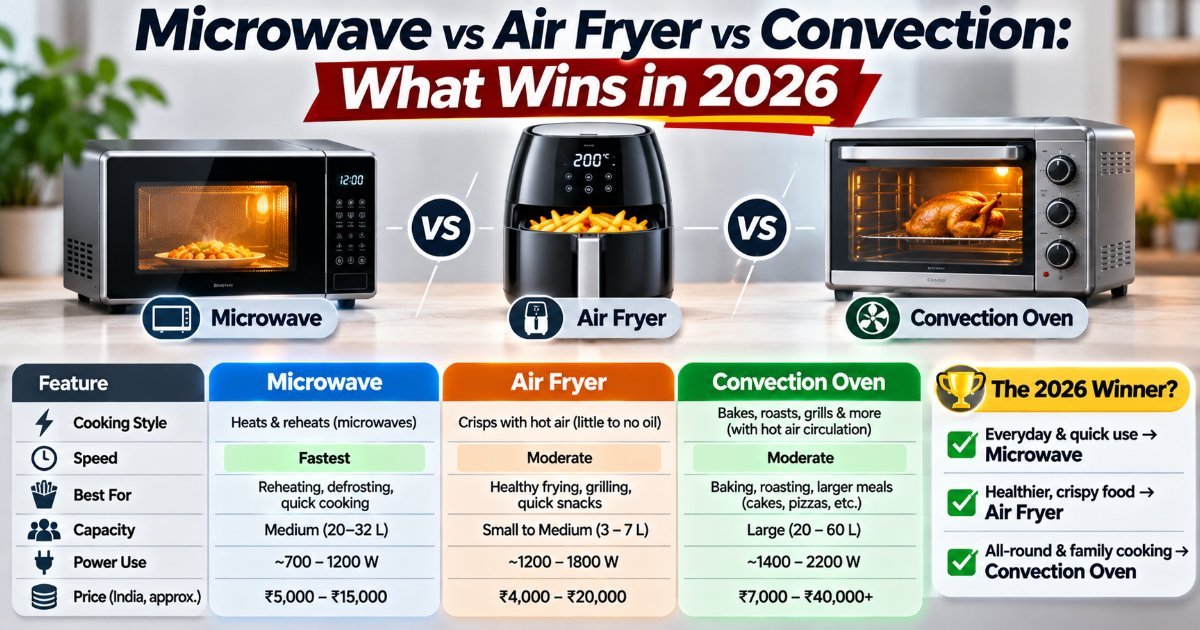
Microwave vs Air Fryer vs Convection: What Wins in 2026
Three appliances, one countertop, and a lot of overlap. Here's what each one genuinely does best in 2026 — and the combo you should probably skip.

Appliance Software Updates: Why They Matter Now
Your washing machine has firmware. Your oven has a network card. Here's how to keep appliance software updates from becoming a weekend project.